
Card Verification Holds at Free OnlyFans Signup Explained
OnlyFans verifies a payment method even when you subscribe to a free page, and that step places a temporary $0.10 hold on your card. The hold is not a subscription charge, it is a small authorization test that confirms your payment details are valid before the platform grants access to zero-dollar accounts. This BestOnlyFans guide explains why the charge appears, how long it takes to clear, and what it means for your balance.
New subscribers often assume a free page requires no financial information at all. In practice, the signup flow asks for card details, runs a micro-authorization, and returns the amount within days. Understanding the sequence removes most of the confusion and the support tickets that follow.

Why OnlyFans Requires Cards for Zero-Dollar Access
A free page has a base subscription price of $0, so no recurring payment is due at signup. The platform still needs a verified payment method on file because account actions beyond the subscription can generate charges at any moment. A tip, a pay-per-view unlock, or a paid chat message all draw on the same stored method.
Payment verification also supports age and identity checks. A card that passes authorization gives the platform a stronger signal than an email address alone. That signal matters for fraud prevention, since stolen accounts and automated signups tend to fail at the payment step.
Three platform requirements sit behind the verification step:
- Billing readiness, so future tips or PPV unlocks process without a second setup delay.
- Age confirmation, since a working payment method is one of several signals used during registration.
- Fraud reduction, because a $0.10 authorization is cheap for a real user but costly for bulk fake signups.
None of these requirements depend on whether the page itself charges money. The verification belongs to the account, not to the individual subscription.
The $0.10 Hold Mechanics Step by Step
When you enter card details, the platform sends a small authorization request to the issuer. The amount is $0.10, not the subscription price, and it is refunded within days. The request does not complete a purchase, so nothing is owed.
The table below shows the typical sequence from entry to clearance.
| Stage | Duration | Subscriber Impact |
|---|---|---|
| Authorization request sent | Seconds | Card details are checked against the issuer |
| Hold placed on the account | 1-5 business days | $0.10 is temporarily unavailable |
| Refund initiated by the platform | Same day as clearance | No action needed from the subscriber |
| Final release by the bank | Up to 10 business days | Balance returns to its prior state |
Timing varies by issuer. Some banks release the hold the same day, while others wait until the next statement cycle. The refund itself is automatic, so you never need to request it.
Tip: if the $0.10 entry still shows after ten business days, screenshot the transaction and your statement date before contacting support. A timestamped record speeds up the trace.
The verification hold is separate from any later subscription charge. If you move from a free page to a paid one, the subscription price is a new transaction, and it follows the platform’s standard range of $4.99 to $49.99.

Payment Method Options and Privacy Considerations
Not every payment method behaves the same way during verification. Some clear faster, and some expose less personal information on the statement. The table below compares the common options.
| Method | Verification Speed | Privacy Level |
|---|---|---|
| Debit card | Fast | Moderate, since the hold lands in your main balance |
| Credit card | Fast | Moderate, with issuer-level dispute options |
| Digital wallet | Fast | Higher, as the wallet masks the underlying card |
| Prepaid card | Varies | High, but some issuers decline the authorization |
Four payment methods ranked by privacy protection for free page registration:
- Digital wallets, which keep the source card number away from the merchant.
- Prepaid cards, which limit exposure but may fail verification.
- Credit cards, which add dispute rights if something goes wrong.
- Debit cards, which are convenient but tie the hold to your main balance.
Privacy level matters more than speed for most subscribers. A wallet or prepaid option reduces how much billing information sits with the platform, though neither guarantees acceptance. It also helps to understand the general mechanics of online payment, since the hold follows the same authorization path as any card-not-present transaction.

Protecting Financial Data During Free Page Registration
Registration is the moment when your payment details are most exposed, so the habits you apply there matter more than at any later point. Keep the process on a private connection rather than public Wi-Fi, and avoid saving card details to shared devices.
Three data-protection habits specific to free-page signup:
- Use a unique password for the account so a database compromise elsewhere cannot unlock it.
- Enable two-factor authentication immediately after the first login.
- Review stored payment methods monthly and remove anything you no longer use.
These steps matter because card data attracts fraud. Familiarity with identity theft patterns helps you spot odd verification requests that arrive outside the normal signup flow.
A verification step that runs through the platform’s own interface is routine. A message asking you to send card photos or codes to a creator or a third-party page is not.

What the Hold Means for Your Available Balance
A $0.10 hold is small, but it can still cause friction in specific situations. The amount sits in a pending state, which means it is deducted from available funds before it is returned.
Three balance scenarios where the hold creates temporary access issues:
- A debit account with under a dollar available, where the hold triggers an overdraft notice.
- A prepaid card loaded to an exact amount, where the hold blocks a later purchase.
- A shared account with low balance alerts enabled, where the pending entry looks like a charge.
Most subscribers never notice the hold because the amount is trivial relative to their balance. The problem appears when the margin is thin, and the pending entry lands before a paycheck or transfer.
If your balance is tight, wait for the refund to clear before adding other recurring commitments. Tracking subscriptions in a simple spreadsheet makes the pending item easy to account for and prevents double-counting. A written record also shows how much free-tier access actually costs over a year once you factor in optional tips and unlocks.
When Verification Fails and How to Resolve It
Verification failures are common and usually fixable. The issuer declines the authorization, the card type is unsupported, or the details were entered with a small error. Each case has a straightforward resolution.

Five common reasons for failed verification holds and their solutions:
- The bank blocked the merchant category. Call the issuer and approve the authorization.
- The card number or expiry was mistyped. Re-enter the details carefully.
- The card is a prepaid type the platform does not accept. Switch to a debit or credit card.
- The billing address does not match the issuer record. Update the address and retry.
- The card has insufficient available funds. Clear a small buffer and submit again.
Repeated failures can lock the payment method for a period, so avoid rapid retries. If three attempts fail, wait a day and confirm with your bank that the authorization requests are visible on their side.
Some subscribers browse free onlyfans girl accounts as a starting point before committing card details at signup. That approach still requires the same $0.10 verification when you register, so treat the hold as a fixed step rather than an optional one. The verification applies to the account regardless of which page you follow first.
BestOnlyFans Listings and Verified Free Account Discovery
Ranking sites exist because the platform has no built-in discovery feed or directory. Without one, subscribers rely on external listings to find pages, and the quality of those listings varies widely. A listing that ignores verification status sends users toward pages that may not accept card payments cleanly.
BestOnlyFans methodology treats verification status as one ranking input alongside activity and pricing transparency. Pages that complete payment verification reliably rank higher in free-page categories, because subscribers reach them without failed authorization attempts.
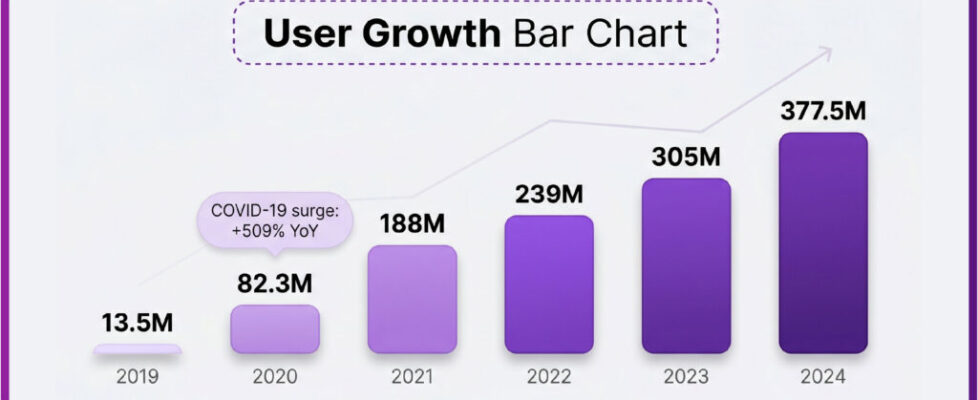
The growth of the platform explains why discovery matters so much now. User numbers climbed sharply after 2020, and the volume of pages made manual browsing impractical.

Listing data also helps with pricing expectations. Free pages earn through PPV messages that unlock up to $50, paid chat that commonly runs $3-$5 per message, and tips that can reach $100. None of those amounts apply at signup, but knowing them prevents surprises later.
Beyond pricing, verified listings also cut down on the number of pages that quietly stop posting. A page that has already cleared payment checks tends to stay active, which reduces the cycle of subscribing, losing interest, and repeating the signup process on a new account.

Conclusion: Confident Free-Page Signup Management
The $0.10 verification hold is a routine authorization, not a subscription charge, and it returns within days. Expect it on every new payment method you add, and treat the pending entry as temporary rather than a cost.
Keep your stored payment methods current, enable two-factor authentication, and review statements after any change. Those habits cover the small risks that come with free-tier access and keep your account in good standing.
Once verification clears, a free page costs nothing to follow. The only money you spend is what you choose to spend on tips, PPV unlocks, or paid messages.
FAQ
Will the $0.10 verification hold appear on my bank statement permanently?
No. The entry shows as pending for one to five business days in most cases, then drops off once the issuer releases it. Some banks display it until the next statement cycle, which can take up to ten business days.
Can I use a prepaid card for free OnlyFans page verification?
Sometimes, but acceptance varies by issuer and card type. Many prepaid cards decline the authorization request, so a debit or credit card is more reliable for first-time verification.
What happens if my bank blocks the OnlyFans verification hold?
The signup will not complete. Contact your issuer, confirm the merchant is approved, and retry once. Repeated attempts in quick succession can lock the payment method for a short period.
How long should I wait before contacting support about a missing refund?
Wait ten business days from the signup date before opening a ticket. Include the transaction date, the amount, and a screenshot of the pending entry so the trace moves quickly.